
Everyone wants to Hack wifi from his mobile android devices.since everyone doesnt own a PC to crack the wifi password with kali linux.So In this tutorial you are going to learn how to hack any wifi from your mobile
So i am writing this article to teach you how to hack wifi easily from you mobile device.We are going to learn 2 different tricks to hack wifi password
What you need to hack wifi password
- An Android Device
- The Android phone must be Rooted
- Good Wifi Signal ( you must be close to the wifi router to hack it FAST)
There are many fake application available on google play, We advice you to stay away from them as they are just FAKE and to waste your time
READ THIS IF YOU STILL CANT HACK WIFI WITH THE STEPS GIVEN BELOW
Methods to Hack Wifi
- Using Android Dumper
- Using Wps Connect
- Using WIFI WPS WPA TESTER
You may also like – How to hack Whatsapp accounts
1.ANDROID DUMPER
Have a non rooted android mobile phone?still want to hack wifi from your android device?worry not.here is a tutorial to hack wifi from your non rooted devices
First of all install Android Dumper from link below

Now lets get started to method:
1.Install Android Dumper in your Android Device.
2.Open it and Scan for available WiFi networks

3.Check the WiFi you want to hack and click on “Try Connect”

4.Now click on “No Root” to hack WiFi from non rooted devices
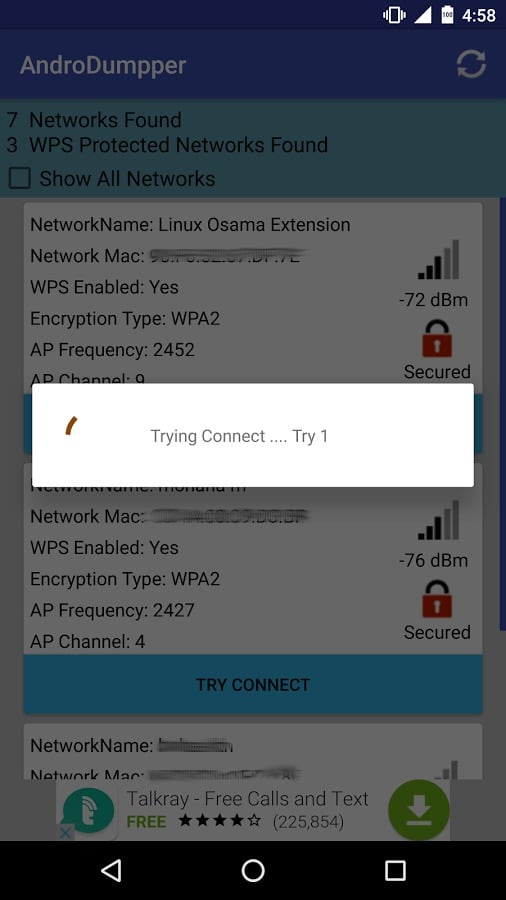
5.Now it will try to connect to wifi

6.If successful then it will show you the password of the hacked WiFi. Thats it .Enjoy
2.WPS CONNECT
Most of you might have already encountered this application through playstore and thought that this is just another fake application to waste our time.But what if u tell you that this is a real and working application to hack wps enabled wifi?
To Start Hacking WIFI Follow The Steps Below
1. Install WPS Connect on your device
2.Open it and click on scan button

3.This will show you all the available wifi networks in the nearby area
4.Now select the network which you want to hack
5.This will open a popup which will have pins. Just click on any pin and it will try that pin to hack password

6.If it fails then try clicking on another pin and test again
7.If it fails again then read the bottom of this post

3.WPS WPA TESTER
Wps Wpa Tester is another application to crack wps enabled wifi networks.It is similar to wps connect but not that advance.
To start hacking follow the steps below
1.First you need to download wps wpa tester
2.Open it and click on scan networks.It will scan available wifi networks in your range.
You can only hack wifi networds which has green colored lock

3.Now click the wifi network you want to hack (it’s lock should be green in color)
4.A popup will open showing list of pins available to crack the wifi.Just click on any pin and press “Try to Connect (root)” button

5.Wait for few seconds while it try to connect
6.Congratulations you have successfully hacked a wifi network from your mobile.Enjoy your free Internet

 Top Reasons it will fail
- You are far away from the Router (Try reducing the distance to -60 and then try again)
- There is Mac filter installed on the router (so just forget about hacking this router from mobile and move on)
- The pin is incorrect (Try another pin)
TIP
If every thing above fails then just go to menu and click on automatic and wait 20-30 mins .It will automatically hack the wifi and auto connect to it else it will show you password in show password

Note: Use these apps only for educational purpose. Never Harm or do illegal things with these wifi hacking applications.I am not responsible for you actions


Follow Us
Were this world an endless plain, and by sailing eastward we could for ever reach new distances